Retrieving data from a public Google Spreadsheet and display it on a webpage

One of the most sought after tasks to create for someone, is the backend for a simple, mostly-static website for which the website owner wants control over is, editing content. So the first thing that comes to mind to almost every developer is WordPress ! At this point in time, no one will go to the extend of creating a custom backend, CMS like system for a website on a very tight budget.
Now imagine telling your client to enter some of the website's data as text into a Google Spreadsheet ! Even to the extent of having multiple sheets within the Spreadsheet - one sheet representing each page or section of the website. That would streamline the process of not having a regular backend database like MySQL or so, that your client need not have training in using a CMS like WordPress or the overhead of setting up a database platform just to publish some 10 page static website. As a website designer / front-end developer, you can focus on the aesthetics and deploy using a Jamstack architecture.
Create a Google Spreadheet with the FAQ data in the first and second columns and share it with Anyone with the link.
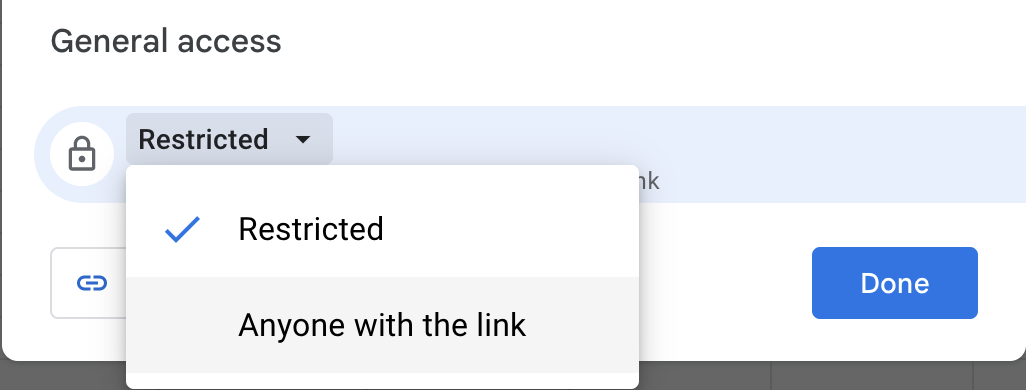
I've created a FAQ and shared (publicly viewable) Google Spreadsheet at : https://docs.google.com/spreadsheets/d/1zwblTR5DWzgOiVxsDYJJkP5Gcmi4OGiCtldI0nyxZGo/edit#gid=0
The FAQ content is taken from razorui.com, a cool UI toolkit based on TailWindCSS.
The URL output as JSON is : https://docs.google.com/spreadsheets/d/1zwblTR5DWzgOiVxsDYJJkP5Gcmi4OGiCtldI0nyxZGo/gviz/tq?tqx=out:json&tq&gid=0
The JSON content received will start like this :
/*O_o*/
google.visualization.Query.setResponse(
and ends in :
);
The actual JSON is within.
Thereby trimming the first 47 characters and the last 2 characters
substring(47).slice(0, -2)
So, we generate the URL and fetch the content and then compile the HTML in the function getFAQ
// This is the SpreadSheet ID
var id = '1zwblTR5DWzgOiVxsDYJJkP5Gcmi4OGiCtldI0nyxZGo';

// This is the sheet ID - you can reference different sheets in the spreadsheet with this
var gid = '0';

// Final URL : https://docs.google.com/spreadsheets/d/1zwblTR5DWzgOiVxsDYJJkP5Gcmi4OGiCtldI0nyxZGo/gviz/tq?tqx=out:json&tq&gid=0
var url = 'https://docs.google.com/spreadsheets/d/'+id+'/gviz/tq?tqx=out:json&tq&gid='+gid;

console.log(url);

fetch(url)
.then((response) => response.text())
.then((data) =>
{
    let json_string = data.substring(47).slice(0, -2);
    let details = getFAQ(JSON.parse(json_string));
    document.getElementById("razorui-faq").innerHTML = details;
});

function getFAQ(json)
{
    let details = '';

    json.table.rows.forEach((row, i) =>
    {
        if (i == 0) return; // The first row is the header

        details += '<details>';

        try { var value = row.c[0].f ? row.c[0].f : row.c[0].v }
        catch(e){ var value = '' }

        details += '<summary>' + value + '</summary>';

        try { var value = row.c[1].f ? row.c[1].f : row.c[1].v }
        catch(e){ var value = '' }

        details += '<p>' + value + '</p>';

        details += '</details>';
    });

    return details;
}
Now imagine you developing a 10-page static website, for a client with a really low-budget, using NextJS and exporting as HTML and then deploying your NextJS website to GitHub using gh-pages for free !
Credit to Google Sheets Expert Mike Steelson for providing the solution.
Full Demo : https://anjanesh.s3.amazonaws.com/demo/faq.html