WordPress Security
Protect a self-hosted WordPress site from attacks by hiding the WordPress login route / URL

WordPress is a nightmare if you don't secure it properly, esp. when the site starts to grow and gets 'known' in the internet. I myself have moved to OctoberCMS but a whole lot of others still prefer WordPress over anything else. So here are 3 tips to secure your WordPress site from attackers.
Install Wordfence plugin (currently version 9.0.0 as of this writing) from wordfence.com or via your WordPress plugin dashboard. Wordfence Free is free - the paid version is $149 USD per year which is only required if your WordPress site grows exponentially with heavy traffic - otherwise the free edition should suffice. Wordfence protects your site from bots and attacks.
If you're using Cloudflare for your domain then go to your domain and under DNS enable proxy under proxy status - in many cases we've been told to use DNS and not enable proxy. This is probably because it prevents server errors like error 500 to be caught on your application server and instead gets caught up at Cloudflare which will show you an error page from Cloudflare instead. Once you're done debugging, change this

to :
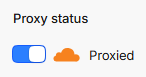
- Change the /wp-login.php to something else that only you and your users would know. Create a
custom_404.htmlpure HTML+CSS page at the root of your WordPress installation directory.
If you're using nginx: Add this in /etc/nginx/sites-available/mydomain.com
server {
	# Add the below code here
}
    location = /wp-login.php {
        error_page 404 /custom_404.html;
        return 404;
    }

    # 2. Secret access point at /backend
    location = /backend {
    # Internally process this as wp-login.php without changing the browser URL
    fastcgi_param SCRIPT_FILENAME $document_root/wp-login.php;

    include fastcgi_params;
    fastcgi_pass unix:/var/run/php/php8.3-fpm.sock; # Ensure PHP version matches your setup
    }

	# 3. Allow public static CSS/JS/Image assets inside /wp-admin/
	location ~* ^/wp-admin/.*\.(css|js|png|jpg|jpeg|gif|ico|svg|woff|woff2|ttf|eot)$ {
	    try_files $uri =404;
	    expires max;
	    log_not_found off;
	}


	# 4. Protect /wp-admin (Return 404 if not logged in)
	location /wp-admin/ {
	    # Check if the WordPress logged-in cookie exists
	    if ($http_cookie !~* "wordpress_logged_in_") {
	        error_page 404 /custom_404.html;
	        return 404;
	    }

	    # If logged in, process PHP normally
	    try_files $uri $uri/ /index.php?$args;
	}
Restart nginx, if in the terminal via SSH, execute sudo systemctl reload nginx
And if you're using Apache with htaccess: (above the standard # BEGIN WordPress block)
# 1. Custom 404 error document mapping
ErrorDocument 404 /custom_404.html

# 2. Block direct access to /wp-login.php with a 404 error
<Files "wp-login.php">
    RewriteEngine On
    RewriteCond %{ENV:REDIRECT_STATUS} !=200
    RewriteRule ^ - [R=404,L]
</Files>

# 3. Secret login URL (/backend -> wp-login.php)
RewriteEngine On
RewriteRule ^backend/?$ wp-login.php [PT,L]

# 4. Protect /wp-admin (Return 404 if NOT logged in, BUT allow CSS/JS/Image assets)
RewriteEngine On
# Condition A: Request is targeting /wp-admin/
RewriteCond %{REQUEST_URI} ^/wp-admin/ [NC]
# Condition B: Request is NOT an allowed static file extension
RewriteCond %{REQUEST_URI} !\.(css|js|png|jpg|jpeg|gif|ico|svg|woff|woff2|ttf|eot)$ [NC]
# Condition C: User does NOT have the WordPress logged-in cookie
RewriteCond %{HTTP_COOKIE} !wordpress_logged_in_ [NC]
# Rule: Return 404 error
RewriteRule ^ - [R=404,L]
Now, finally, add this PHP code to wp-content/themes/themeName/functions.php file:
// 1. Rewrite internal wp-login.php URLs to /backend
add_filter('site_url', 'custom_login_url', 10, 4);
function custom_login_url($url, $path, $scheme, $blog_id) {
    if ($path === 'wp-login.php' || strstr($url, 'wp-login.php')) {
        return site_url('/backend', $scheme);
    }
    return $url;
}

// 2. Fix the Logout URL generation to pass a valid nonce with the custom path
add_filter('logout_url', 'custom_logout_url', 10, 2);
function custom_logout_url($logout_url, $redirect) {
    return wp_nonce_url(site_url('/backend?action=logout'), 'log-out');
}

// 3. Catch logout action early and force cookie destruction (Bypasses "Do you really want to log out?")
add_action('init', 'custom_force_logout');
function custom_force_logout() {
    // Intercept anytime /backend is called with action=logout
    if (isset($_GET['action']) && $_GET['action'] === 'logout') {
        // Log out the current user and destroy all session cookies
        wp_logout();

        // Clear auth cookies explicitly as a fallback
        wp_clear_auth_cookie();

        // Redirect cleanly to /backend without any query parameters
        wp_safe_redirect(site_url('/backend?loggedout=true'));
        exit;
    }
}

// 4. Ensure logout action redirects properly if triggered elsewhere
add_action('wp_logout', 'custom_logout_redirect');
function custom_logout_redirect() {
    wp_safe_redirect(site_url('/backend?loggedout=true'));
    exit;
}
PS: Assisted help with Google Gemini Flash 3.6 for code.
About the author
- I am a web developer from Navi Mumbai. Mainly dealt with LAMP stack, now into Django and getting into Laravel and Cloud. Founder of nerul.in and gaali.in
Comments
Join the discussionNo comments yet. Be the first to comment.